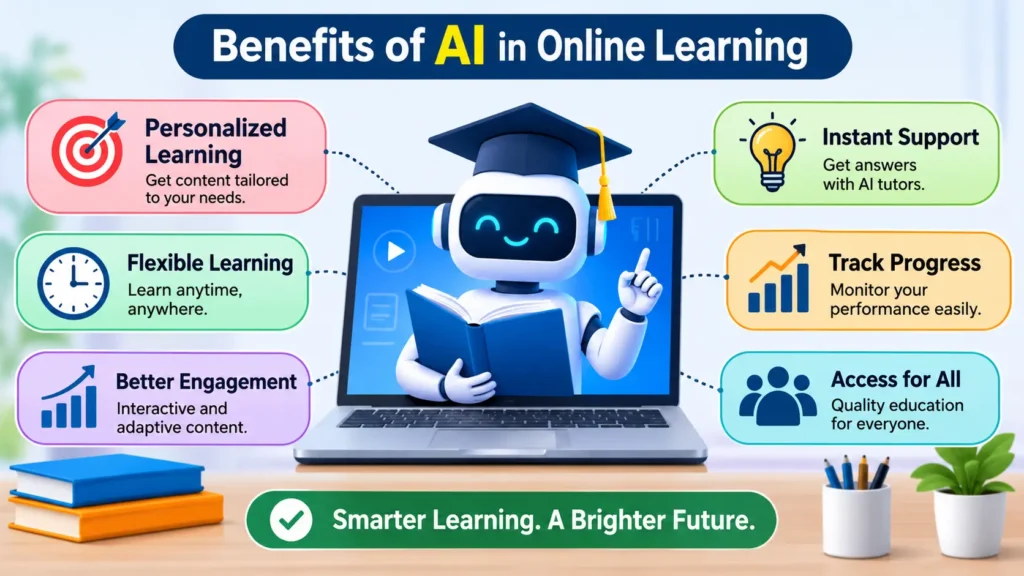
I have spent years working with online courses, and one thing always stands out. Students quit when they feel stuck and alone. The biggest benefits of AI in online learning fix exactly that problem.
AI gives learners fast help, lessons that fit their level, and clear feedback. It does not replace good teaching. It fills the gaps that a busy teacher cannot cover.
In this post, I will show you what works, what does not, and how to start.
What Are the Benefits of AI in Online Learning?
The benefits of AI in online learning include personalized lessons, instant feedback, 24/7 tutoring support, and faster progress tracking. AI tools study how a student learns, then adjust the pace and difficulty. This helps learners study smarter, stay motivated, and get help without waiting for a teacher.
That is the short answer. Now let me explain each benefit with real examples.
7 Advantages of AI for Students
1. Lessons That Match Your Level
A classic study by educational psychologist Benjamin Bloom, published in 1984, found that students with one-on-one tutoring performed about two standard deviations better than students in a regular class. Researchers call this the 2 sigma problem.
One tutor for every student costs too much. AI offers a lower-cost way to get closer to that result.
Here is how it works. An adaptive platform tracks your answers. If you miss three fraction questions, it gives you an easier explanation. If you ace them, it moves you ahead. You never waste time on what you already know.
2. Instant Feedback
In a normal online course, you may wait days for a grade. By then, you have forgotten what you wrote.
AI tools check quizzes, code, and short answers in seconds. Language apps like Duolingo use this to correct your mistakes right away. Quick feedback helps you fix errors while the lesson is still fresh.
3. Help at Any Hour
Most adult learners study at night, after work or family time. Teachers sleep at night. AI tutors do not.
Tools like Khan Academy’s Khanmigo guide students through problems with questions instead of handing over answers. That design matters. It pushes you to think, not copy.
4. Early Warning for Struggling Students
AI can spot patterns that people miss. A student who skips logins, rushes quizzes, or stops submitting work often needs help.
Georgia State University tested a chatbot named Pounce to guide incoming students through enrollment tasks. A published study found it reduced summer melt, the drop-off between acceptance and arrival, by 21.4 percent among those who received the messages. Small nudges worked.
5. Less Busywork for Teachers
Teachers spend hours on grading, emails, and lesson plans. AI can draft quiz questions, sort common mistakes, and answer routine questions.
That frees teachers to do what software cannot do. They can coach, encourage, and talk with students one on one.
6. Better Access for More Learners
AI makes courses easier to use for many people. Auto captions help deaf and hard-of-hearing students. Text-to-speech helps learners with dyslexia or low vision. Instant translation helps students who study in a second language.
This matters in places where good teachers are hard to find.
7. A Study Plan That Fits Your Life
AI can build a weekly plan from your goal, your deadline, and your free time. Tell it you have an exam in six weeks and only one hour a day. It will sort topics by priority and give you practice sets.
I use this method myself when I learn a new skill. It beats a random to-do list every time.
Pro-Tip: Never ask AI, Give me the answer. Ask, Quiz me on this topic, one question at a time, and explain what I got wrong.” This simple change turns AI into a coach. It also keeps your own brain doing the work, which is how real learning sticks.
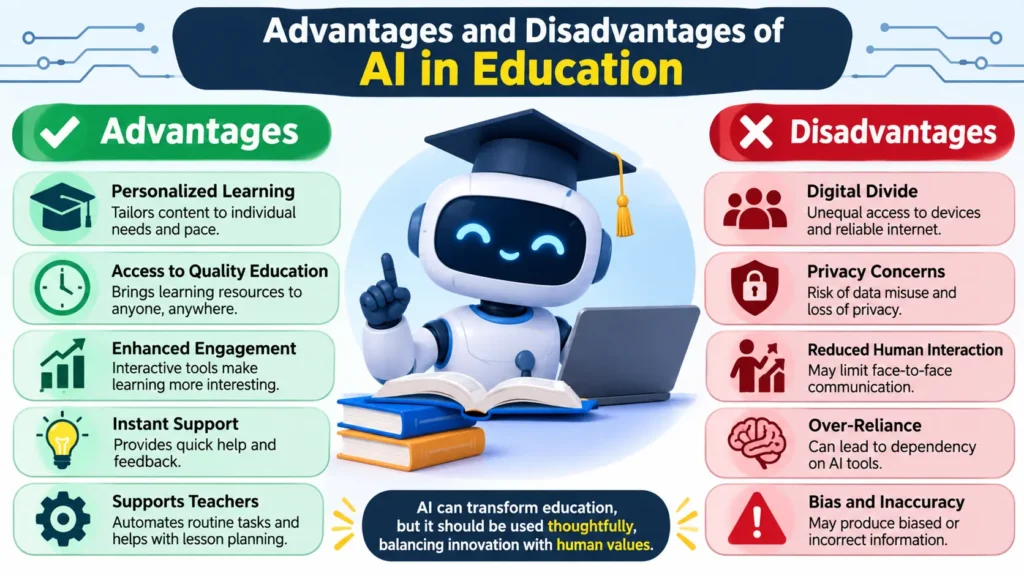
Advantages and Disadvantages of AI in Education
AI is not perfect. I always tell people to weigh both sides before they trust any tool.
Advantages at a Glance
- Personal pace and difficulty
- Fast feedback on practice work
- Support available day and night
- Early alerts for students who struggle
- Lower workload for teachers
- Better access for learners with different needs
Disadvantages You Should Know
- Wrong answers. AI tools can state false facts with total confidence. Always check important claims against a textbook or trusted source.
- Cheating risk. Students can paste an assignment into a chatbot and submit the result. Schools need clear rules.
- Privacy concerns. Learning platforms collect data about children and adults. Read the privacy policy before you sign up.
- Bias. AI learns from existing data, so it can repeat unfair patterns.
- Weaker thinking skills. If students lean on AI for every task, they may stop practicing hard thinking.
- Unequal access. Students without a fast internet connection or a modern device get left behind.
UNESCO has urged schools to protect student data and keep humans in charge of teaching decisions. I agree with that advice.
How to Start Using AI in Your Online Learning
You do not need fancy software. Follow these steps.
- Pick one goal. Choose something clear, like “pass my statistics exam” or “learn basic Spanish in three months.”
- Choose one tool. Start with the AI features inside your course platform, or a trusted tutor tool. Do not test five apps at once.
- Tell the tool your level. Say what you already know and where you struggle. Better input gives better help.
- Practice, then ask for feedback. Do the work first. Then ask AI to review it and point out errors.
- Verify key facts. Check names, dates, formulas, and sources in a reliable book or website.
- Review weekly. Look at your progress. Drop what does not help and keep what does.
Final Thoughts
The benefits of AI in online learning are real, but they depend on how you use it. Personal lessons, quick feedback, and round-the-clock support can help any student. Weak facts, privacy risks, and lazy habits can hurt them.
My advice is simple. Start small. Use how AI help student to learn better to practice and get feedback, not to skip the work. Check what it tells you. Keep real people in the loop.
Pick one course this week, try one AI feature, and see how your study time changes.
Frequently Asked Questions
Yes, when you use it as a helper and not a shortcut. Research on tutoring shows that personal attention improves results. AI can deliver some of that attention at scale. Still, it works best next to a real teacher.
No. AI can explain a concept or grade a quiz. It cannot notice that a student looks upset, build trust, or inspire a love of learning. Teachers do those things, and they matter most.
Over-reliance. A student who lets AI write every essay learns very little. Set clear rules: use AI to practice, plan, and get feedback, but write your own work.
It depends on the tool. Choose products built for schools, check how they store data, and involve a parent or teacher. UNESCO’s guidance on generative AI in schools recommends age limits and strong data protection.
Look for tools that explain, quiz, and give feedback. Examples include Khanmigo for guided tutoring, Duolingo for language practice, and the built-in AI helpers in many learning platforms. Features change often, so test a tool before you commit.

Our uncompromising commitment to data and accuracy starts with Yadwender. Relying on a rich background in quantitative market research and technical analysis, he meticulously vets emerging AI trends, ensuring every statistic, case study, and claim published on our platform is verifiable and sourced from industry-leading data.